
By relieving the brain of all unnecessary work, a good notation sets it free to concentrate on more advanced problems…
—
Whitehead , An Introduction to Mathematics (1911)
Notation is important. The right one can be a tool that makes working through some problems possible at all. It was always challenging to explore Keyhive’s design in plain prose or with existing notations.
In the previous lab note, we presented certificate flow (certflow) diagrams. Certflow diagrams provide a snapshot of who can do what at a point in time. They’re very helpful for small sketches, but can get pretty hairy when trying to use them to work through complex scenarios or when you need to reason about authority evolving in time — so much so that we presented them by animating one step at a time. Rain diagrams are certflow merged with sequence
Notation isn’t only there to be a “correct” model. Keyhive already has precise descriptions: the implementation, spec, etc. Diagrams are a tool for thinking and communication. During the design phase, it is much more natural to draw a picture, erase parts, rearrange others, and tell a story than it is to write a series of scripts that show how something works. A diagram explains the “what”, not the “how”.
From “Certificate Flow” to “Rain” Diagrams
Let’s start with a familiar scenario for those who have been following along with the earlier lab notes. Here’s the first diagram from the earlier certflow note: Carol grants Alice Admin over herself, and Alice delegates Edit over Carol to Bob.
Now the same story as a rain diagram. Each principal gets a lifeline, certificates are notated as labelled arrows supplying power to principals, and authority drips down the page.
Notice that we don’t need separate build steps to explain what’s happening: time (or at least causality) is captured in the notation directly.
Notation
- Lifelines fall from each principal’s head. Time runs downwards.
- Rows are certificates: an arrow from the issuer’s lifeline to the audience’s, at the moment it was signed. Lower rows happened later.
- Dashed lines are powerlines (named for UCAN’s
powerlines ): the flow of authority, as in certflow. A powerline starts at its subject’s head, or at a small circle further down its lifeline when that’s closer. - Small circles on a certificate are transitive handles. The membership is carrying another subject’s authority along, so that subject’s powerline runs into the circle and out the other side, in the subject’s colour.
- Diamonds are revocations. They’re rows too, and necessarily come later than what they revoke. The red line runs across to sit right under the certificate, then points up (“back in time”) to cross it out.
- Double lines are invocations: a principal using its authority on the subject (say, editing a document). The box has a double outline to match and sits right under the delegation that powers it, with a powerline dropping straight into it.
- The dotted line is “now”: everything above it has happened. Its handle opens a certflow snapshot of that moment.
As in many diagramming styles, colour carries no meaning of its own, but it certainly helps keep things straight.
A More Involved Example
Here’s a more complex example. Click the little clock on the right side of the dotted line to see the certflow equivalent, and drag the line up and down to see the preview at different points in the flow.
- Each comment thread is its own document. Thread 1 is created, granting the Commenters group
Admin. - As the group’s creator, Alice holds
Adminover Commenters. - Alice adds Carol to Commenters with
Edit. Notice the powerline: Carol’s certificate is backed by Alice’s authority over Commenters. - Alice adds Bob the same way.
- Thread 2 is created, granting Commenters
Admintoo. - The Essay grants Alice
Adminover itself. - Alice uses her authority over the Essay to give Commenters
Read. Now try hovering over Bob to trace everything he can reach.
For delegations and revocations, the two notations carry the same information. Rain diagrams just make it easy to talk about order, or about regions of time (for example, up to the point at which someone is revoked).
Transitive Authority
Direct delegation is straightforward, but authority often passes through a group. Here the Team has Edit on the Doc, and Alice is an Admin of the Team. When Alice delegates Edit over the Doc to Bob, that authority comes from the Doc, through the Team, and on through Alice’s membership. To show the hop, Alice’s Admin membership gets a small circle in the Doc’s colour: the same kind of circle a powerline can start from on a lifeline, but sitting on a certificate.
Revocation
As mentioned in earlier lab notes, revocation in Keyhive is
- The Doc grants Alice
Editover itself. - Alice passes
Editon to Bob. - Bob gives Carol
Read. - Carol shares
Readwith Dan. - Alice revokes Carol’s certificate to Dan, two hops downstream. Alice didn’t sign that certificate, but Dan’s access runs through Alice, so Alice can cut it. The red dashes come from the Doc→Alice certificate: the authority that flows through Alice.
- Dan loses access. Bob and Carol keep theirs, because their certificates don’t depend on the one Alice revoked.
Invocation
So far we’ve only moved authority around. Sooner or later someone actually uses it, like Bob editing the Doc. That’s an invocation, drawn as a double line from the principal’s lifeline to the subject’s, at the moment it happened, with a powerline dropping in from the authority it relied on.
Invocations always “close the loop”. Authority leaves the subject, runs down a chain of delegations to the principal, and the invocation points back at where it all started (the subject). Certflow has no natural way to show that invocations (e.g. edits to a document) happen in an order.
Plain Text
As nice as colourful SVGs are, rain diagrams are basically just a grid of lifelines and rows. They can be drawn in plain text,2 right next to the code they explain. For example:
 (Doc)       (Alice)       (Bob)       (Carol)       (Dan)
   │╰┄┄┄╮ ╭┄┄┄┄┄┼┄┄┄┄╮       │            │            │
   ├──[edit]───▶│    ┆       │            │            │   1. The Doc grants Alice Edit
   │     ┆      │    ┆       │            │            │
   │     ┆      │    ┆ ╭┄┄┄┄┄┼┄┄┄┄╮       │            │
   │     ┆      ├──[edit]───▶│    ┆       │            │   2. Alice passes Edit to Bob
   │     ┆      │    ┆       │    ┆       │            │
   │     ┆      │    ┆       │    ┆       │            │
   │◀════╪══════╪═[[edit]]═══╡    ┆       │            │   3. Bob edits the Doc
   │     ┆      │            │    ┆       │            │
   │     ┆      │            │    ┆ ╭┄┄┄┄┄┼┄┄┄┄╮       │
   │     ┆      │            ├──[read]───▶│    ┆       │   4. Bob gives Carol Read
   │     ┆      │            │            │    ┆       │
   │     ┆      │            │            │    ┆       │
   │     ┆      │            │            ├──[read]───▶│   5. Carol shares Read with Dan
   │     ┆      │            │            │    ✗       │
   │     ┆      │            │            │    │       │
   │     ╰┄┄┄┄┄┄o────────────┼────────────┼─<revoke>   │   6. Alice revokes Carol→Dan
   │            │            │            │            │
We can even embed little fragments of this inline in prose. Instead of “Alice delegates Edit over the Doc to Bob”, you can draw (Alice)-[edit(Doc)]->(Bob).3 Principals get round brackets and certificates get square ones, just like the shapes in the diagrams, with the subject tucked inside the certificate. When the subject is obvious from context, shorten it to (Alice)-[edit]->(Bob). Invocations get double lines, of course: (Bob)=[[edit]]=>(Doc).
Hand Drawn
Like certflow, rain diagrams don’t need colour, or a computer. If anything, they’re easier to sketch than certflow. Here’s a real, recent example (apologies for the horrible handwriting):
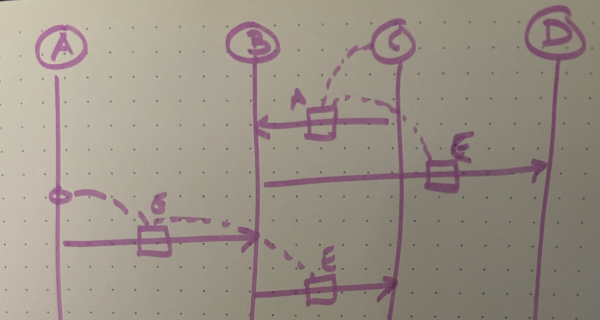
A diagram from an in-person working session.
Notice here that we’re only using A and E for Admin and Edit respectively. The shorthand that we often use is:
A: AdministerE: EditR: ReadL: Relay
Try It Yourself
Drag from one lifeline to another to delegate at that moment, or pick ✏️ Edit on the menu’s last row to have the first principal use its authority on the second (say, Bob editing the Doc). Use the hand tool to drag certificates up and down. Try giving Bob Edit and having Bob edit the Doc, then revoke that certificate and watch the edit go void.
Keyhive delegations are causally consistent: a certificate always comes after the delegation that gave its issuer the power to sign it. Beyond that, shuffle away! Authority only cares which certificates exist, so you can drag a certificate anywhere below what it relies on and above what relies on it, and the outcome never changes. Go on, try to break it.
One More Thing
Want to go further?
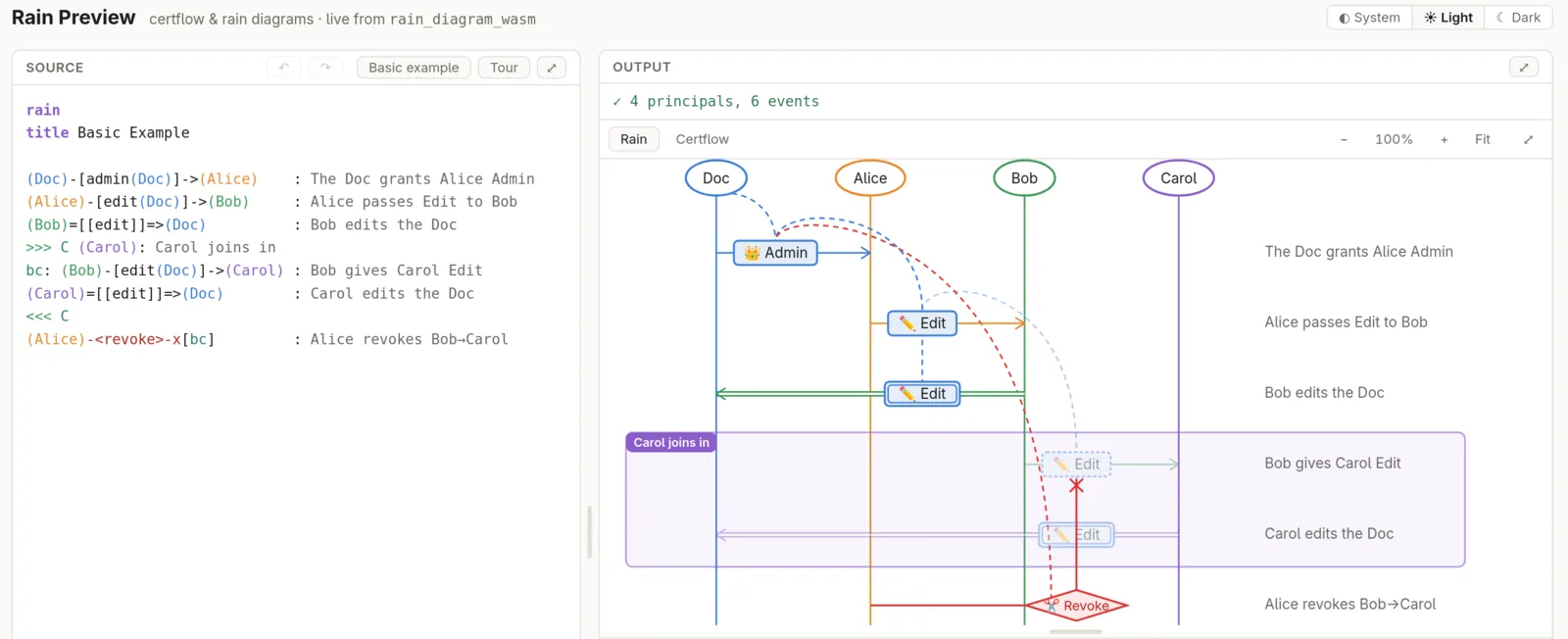
Downpour’s live
Rain diagrams are close cousins of the space-time diagrams in Lamport’s Time, Clocks, and the Ordering of Events in a Distributed
System (1978), where processes are vertical lines and messages run between them, and of the Message SequenceCharts that UML’s sequence diagrams drew on. ↩︎Network protocol specs have drawn sequence diagrams in plain text for decades, such as the TLS 1.3 handshake in RFC
8446 . ↩︎A formal way to write this comes from the “speaks for” logic in Lampson, Abadi, Burrows, and Wobber’s Authentication in Distributed Systems: Theory and
Practice (1992), where Bob holding Alice’s authority is writtenBob ⇒ Alice. Ours is a pictoral variant. ↩︎