

Introduction
In the Livelymerge project, Dan Ingalls, Peter van Hardenberg, and I (Alex Warth) are exploring the opportunities and challenges that arise from using an Automerge document as the heap of a program.
A couple of opportunities:
-
Persistence: The program’s heap is persistent, similar to a Smalltalk image. If you close the program today and open it two weeks from now, every object will be exactly as you left it.
-
Collaboration: In a multi-user context, all of the participants will share the same heap, which makes this an interesting medium for collaboration.
Some challenges:
- Consistency:
- When multiple users are present, who is in charge of running what “processes”? E.g., if the program implements a simulation and more than one user is running the code, it’s possible that some side effects will run two or more times which is undesirable.
- Is it possible to represent the program’s state in such a way that its invariants will be preserved when automatic merges happen as a result of multiple users’ interactions with overlapping sets of objects?
- Performance: Can we get programs to run fast enough for authentic use?
- Support for long-running programs: We’d like to be able to support programs that we can “live in” — the kind of system Dan is known for, like
Squeak and the LivelyKernel . But these programs run for an unbounded amount of time, and so their corresponding Automerge documents will accumulate a very large number of changes. Can we pull this off? If not (given the current implementation of Automerge) are there changes to AM (planned or otherwise) that could make this work?
This note describes the object model we designed and implemented for this project. It automatically serializes and deserializes data from/to the program’s Automerge document. You’ll see what this means and why it’s needed soon. But first…
Why “Lively”?
The programs we’re most interested in for this project are self-sustaining systems like Squeak and the Lively Kernel. We’re creating a new system in the same vein, but this time we’re designing it from the ground up to be “multi-user” and collaborative, leveraging the good stuff that we get from Automerge.
Dan’s Lively Kernel (LK) is a Squeak-like system that was written entirely in Javascript and runs inside the web browser. A user of the system can conjure up a Smalltalk-style browser and modify any aspect of the system (e.g., the way text editing works or even the browser itself!) while it’s running. The effects of the user’s changes happen immediately.
As part of the Livelymerge project, Dan has written a new LK-like system whose heap is represented as an Automerge document. It includes a graphical user interface based on
(Sidebar: for a long time, I’ve wanted my colleagues at Ink & Switch to experience this kind of self-sustaining system firsthand, and this project was a good excuse to make that happen.)
LM’s Object Model
LM programs are written in ordinary JavaScript: object and array literals, top-level declarations, closures, even class syntax all work the way you’d expect. The difference is where the objects live: their state is represented in the program’s associated Automerge document instead of the JS heap. This means that our objects are persistent and support collaboration right out of the box.
The implementation has two main ingredients:
- An object model — the subject of this note — consisting of the global object (the equivalent of JavaScript’s
globalThis, and the root of the heap) plus a small set of primitives for creating new objects, arrays, and functions in the heap. - A transpiler that rewrites plain JavaScript to use those primitives, so you never call them yourself. (The transpiler probably deserves its own lab note; here I’ll stick to the object model underneath it.)
Here’s a simple example to get us going:
f = (x, y) => x * y + 2;
f(5, 8); // evaluates to 42
This looks pretty “vanilla” so far, but there’s something interesting going on. Because f is a global, it lives in the program’s heap — i.e., in the Automerge document. For example, suppose you and I are both working on this program, but from different computers. If I evaluate the first statement, f is stored in our heap. This means that if you evaluate the second statement without having evaluated the first, you will still get the expected result (42).
Here’s another example — this one usually gets an “oooohhh” when we demo it:
makeCounter = () => {
  let count = 0;
  return () => ++count;
};
counter = makeCounter();
counter(); // evaluates to 1
counter(); // evaluates to 2
So far, so JavaScript: counter is a closure, and each call bumps the count variable it captured. Now for the “oooohhh” part: if you evaluate counter() on your computer, you’ll get 3. The captured count isn’t sitting in my JS heap — it lives in our Automerge document, like everything else. In other words, the state of a closure’s free variables is persistent and shared, too. We’ll see how this works soon.
Representing Objects in the AM Document
In our object model, a property of an object can hold any value, including a reference to another object or even the object itself:
obj.self = obj;
So, just like in JS, it is possible for the heap of a LM program to contain cycles. But as we explained earlier, the entire heap is represented as an AM document, which is JSON-like and must be tree-shaped. This means that our object model’s implementation must serialize values to an AM-compatible format. Here’s what our serialized heap looks like:
{
  objectTable: {
    '84f2…': <<state of object w/ id 84f2…>>,
    'd9c0…': <<state of object w/ id d9c0…>>,
    ...
  }
}
As you can see, we have an object table that maps object ids to their state. Note that object ids can’t be sequential as this would result in clashes (think multi-user!) so we use UUIDs.
Here’s what the state of an object in the object table looks like:
{
  // the names of special properties are prefixed with a $
  $type: 'obj',
  $id: '84f2…',      // id of this object
  $protoId: 'd9c0…', // id of the object that this object delegates to

  // user properties are prefixed with a @ (this sidesteps an Automerge
  // bug involving property names like `toString` that collide with
  // Object.prototype)
  '@x': 5, // numbers are represented ...
  '@y': 6, // ... as numbers

  // object references (like the value of the `next` property below)
  // are represented as objects with `$type = 'ref'` and the id of
  // the referent:
  '@next': { $type: 'ref', $id: '52aa…' },
}
Functions get their own entries in the object table, too — they’re first-class objects, after all:
{
  $type: 'fun',
  $id: '7e1b…',
  $code: '($scope1) => (x) => x + $scope1.y',  // what we evaluate
  $codeForShow: '(x) => x + y',                // what we show the user
  $scopes: [{ $type: 'ref', $id: '05fd…' }],   // captured environment
}
Note the $scopes property: the transpiler analyzes each function for free variables, moves captured bindings onto scope objects (which are ordinary heap objects), and serializes the function together with references to its scopes. This is what made the counter example work: count lives in a scope object in the heap, so when you called counter(), you and I were incrementing the same count.
Arrays
An array value can’t just be represented as an array of serialized values. This is because it needs an id in order for other objects to be able to reference (alias!) it. So each array in LM has an entry in the object table, with $type = 'arr' and a $values property that holds its (serialized) elements. This representation enables arrays in our object model to benefit from the array merge semantics in AM: if you push onto an array while I splice something out of it, both edits survive the merge.
The interface to LM’s object model
Now that we know how objects are represented, we can discuss the interface in more detail.
The global object
The global object is the root of LM’s heap, and it is represented in the object table as the object with id global. When your code refers to a global (e.g., f(5, 8) above), the transpiler rewrites that reference into a property access on a proxy for the global object. This proxy intercepts reads from and writes to the object’s properties:
- On a write, the proxy will serialize the value that’s being written to the property and store it in the appropriate place in the program’s AM document.
- On a read, the proxy will find the corresponding serialized value in the program’s AM document. It will then return the result of deserializing that value.
Serializing values
The serialized representation of a value depends on its type:
- A primitive value (e.g., a number, string, or boolean) is serialized as itself.
- An object, array, or function is serialized as
{ $type: 'ref', $id: ... }— a reference to its entry in the object table.
The sample object table in the previous section includes examples of each of these types.
Deserializing values
Here’s how deserialization works:
- A serialized primitive value deserializes to itself.
- A serialized reference deserializes to a proxy for the referent. (For a function, calling the proxy evaluates the function’s
$codeagainst its deserialized$scopes.)
The global object is not special in this respect: in LM, every time we interact with an object, we’re really interacting with a proxy that knows which object it’s for. One detail that matters in practice: proxies are cached per object id, so deserializing the same object twice gives you the same proxy — which means ===, Map keys, and Set membership work the way you’d expect.
Creating objects
When your code contains an object, array, or function literal — { x: 5 }, [1, 2, 3], (x) => x + 1 — the transpiler rewrites it into a call to the corresponding creation primitive. That call does two things: it adds a new (serialized) entry to the object table, and it returns a proxy for the new object.
Class declarations get the same treatment: the class becomes a constructor function in the heap, and its methods live on a prototype object that instances delegate to (via $protoId). And since classes and methods are heap objects like everything else, redefining a method — say, from the system browser — takes effect immediately for every collaborator.
Together, the transpiler and the proxies are what make LM code feel like plain JavaScript — and the work is split cleanly between them. The transpiler rewrites the syntax that gets things into the heap: literals, global references, the local variables captured by closures. Everything you subsequently do with the objects in the heap — reading and writing properties, calling methods — goes through their proxies, which take care of all of the serialization and deserialization involved.
The LM tool
We have implemented Livelymerge as a tool for Patchwork. Here’s what a freshly-created LM document looks like when viewed through this tool:
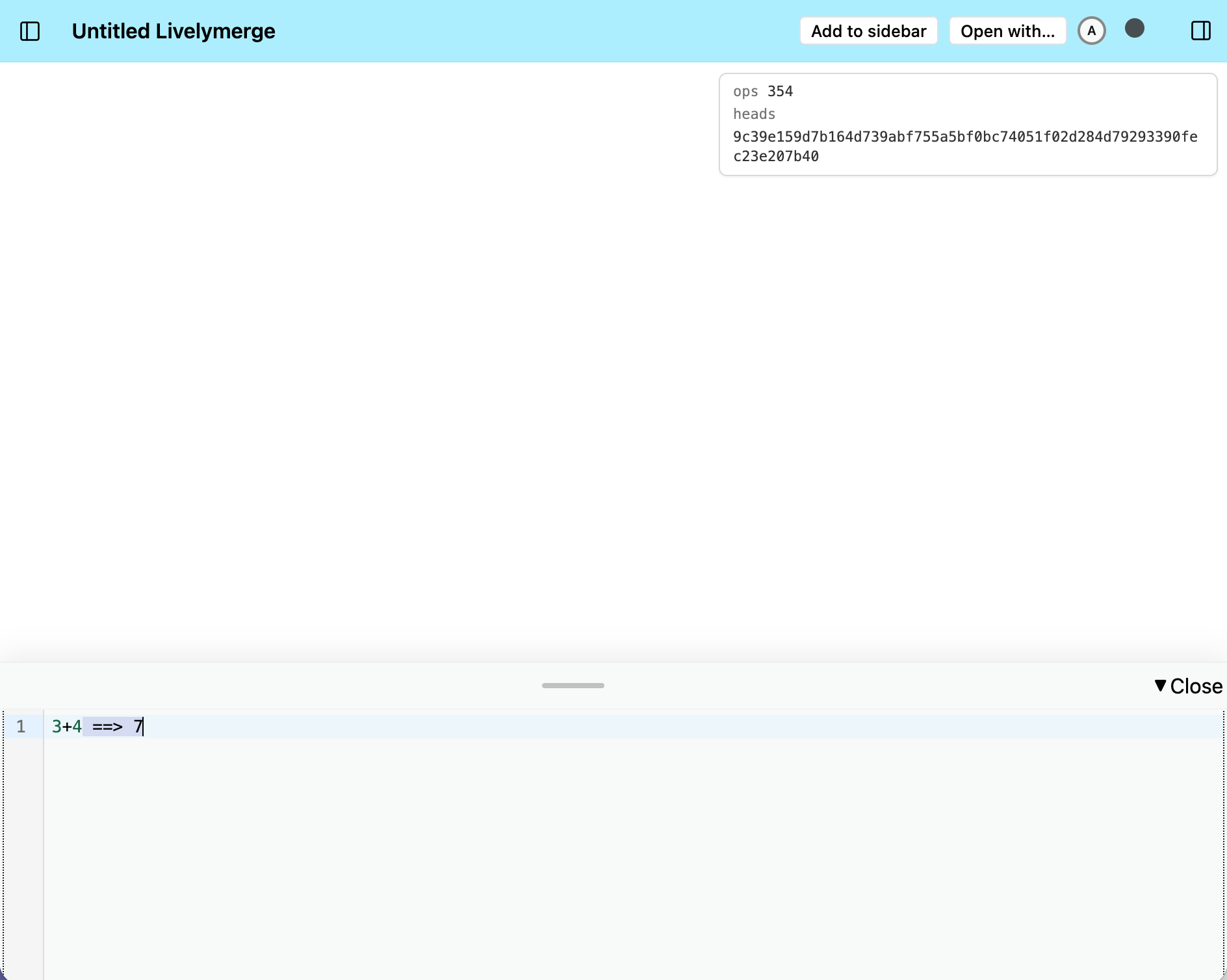
A freshly-created Livelymerge document. The canvas is still blank; the panel in the top-right corner shows the state of the underlying Automerge document (its number of operations and current heads); and the workspace is open at the bottom, where we’ve just evaluated 3+4 with a print-it.
At the bottom of the page there is a large text area that works like a Smalltalk workspace. If the user selects some of the code inside the workspace and invokes “print it” (Cmd-P), that code will be evaluated by LM and the result will be displayed (by appending its stringified value to the workspace). “Do it” (Cmd-D) evaluates the selected code but doesn’t display the result.
The area at the center of the page is an (initially blank) HTML canvas. We provide a canvas global that enables an LM program to draw whatever it wants on it. (The canvas is a per-user host resource, so it’s stored in the heap as a symbolic, late-bound reference: the AM document just says “canvas”, and each user’s replica resolves that to their canvas at run time.)
You can write and execute code in the workspace that creates new objects in the heap and (via the aforementioned canvas bindings) implements a LK-like GUI, as shown below:
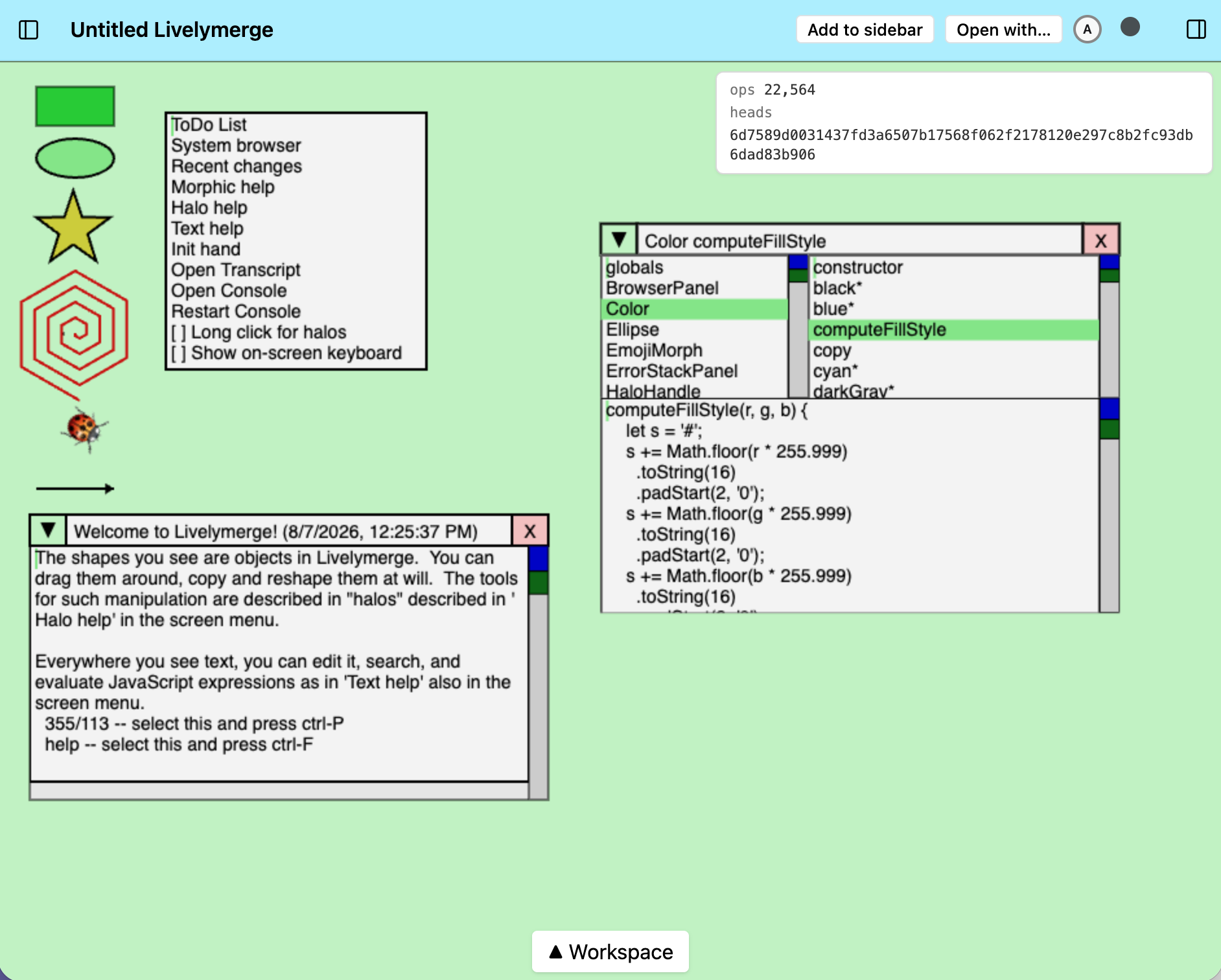
The same tool, after some code has been evaluated in the workspace: a Morphic world with draggable shapes, a world menu, a welcome window, and a Smalltalk-style browser showing the source code of Color.prototype.computeFillStyle. Every one of these is an object in the heap — i.e., in the Automerge document (note the op count in the corner!) — and all of it can be edited from inside the system.
Dan is working on a lab note about the system depicted above, so stay tuned! In the meantime, I’ll use the rest of this section to explain how the LM tool hosts this system, focusing on its interaction with the program’s AM document.
The change function
Our LM tool has a DocHandle for the program’s AM document, and it makes changes to the document via the handle’s change method. But we don’t call that method directly from the UI — instead, we wrap it in our own change function:
function change(fn) {
  let exception;
  let returnValue;
  docHandle.change((_doc) => {
    doc = _doc;
    $global = proxify(doc.objectTable.global);
    try {
      returnValue = fn();
    } catch (e) {
      exception = e;
    } finally {
      gc();
    }
  });
  if (exception) {
    console.error(exception);
    throw exception;
  }
  return returnValue;
}
(This is slightly simplified — the real version also handles nested calls and some bookkeeping that’s out of scope for this note.)
The argument to this function (fn) is the code that we want to execute in LM. Usually it’s a function that is created from the code that the user selected in the workspace. But we also use it in the event processing and rendering loop. (More on this in the next section.)
Note that we capture the latest version of the document (doc = _doc) inside the callback. I get that this looks funny/dangerous/wrong, but this is OK because doc is only used inside (more precisely, in the extent of) the function that’s passed to change. (We could instead just pass doc around, from function to function, but it would be more cumbersome than this funny-looking hack so I decided against it.)
Garbage Collection
LM performs garbage collection at the end of every change. An important service provided by our garbage collector has to do with freshly-created objects. I’ll illustrate why this is important by describing how rendering works in the system.
LM rerenders everything 60 times per second. This is done by calling the function render() which is written by the user. Now, it’s common for lots of fresh objects to be created while rendering. As an example, we often compute bounding boxes for morphs (Morphic objects) because we need that information but we don’t hold onto the bounding box objects. These objects are known as fresh garbage in generational GCs, and collecting them quickly and cheaply is important.
Now, here’s the thing: even if we collected fresh garbage promptly, installing it in the object table in the first place would be a disaster. Adding an object to the table and removing it inside a single call to the doc handle’s change method is effectively a no-op — but Automerge still logs every individual operation, forever. Sixty frames per second of bounding boxes would permanently bloat the document’s history with records of objects that lived for a few milliseconds.
So new objects are not installed in the AM document’s object table right away. Instead, they live in a shadow document — a plain, local JS structure with the same shape as the AM document. At the end of each change, the GC promotes into the object table only the fresh objects that have become reachable from the root of the heap; the rest are reclaimed without the AM document ever knowing they existed.
This lets us create lots of (temporary) fresh garbage like points and bounding boxes during rendering without accumulating useless operations in the AM document. (We push this “op economy” further in other ways, too — e.g., writes that would store an identical value are elided — to the point where an idle frame generates zero Automerge operations, as a runtime guarantee. Our op economy work, along with several other optimizations that we found to make a big difference, will be discussed in an upcoming lab note.)
One more thing our GC does that may surprise you: objects that have made it into the AM document are never collected. Reachability is a global property in a local-first system — an offline collaborator may still hold or re-link an object that looks unreachable from where I’m standing, and a local sweep would silently destroy their work at merge time. So our policy is: once persistent, immortal. (This costs nothing in terms of the document’s history, which only ever grows anyway; but it does grow the current-state snapshot.)
Related Work
The Backstitch project at Ink & Switch is exploring the use of Automerge to enable collaborative editing/authoring of
Gilad Bracha is currently experimenting with a
Coming Up
We have a lot more to say about Livelymerge. A few threads I’m planning to pull on in upcoming notes in this series:
Local state. In a multi-user system, not everything should be shared: things like my halo (a ring of command handles that appears around a morph) and my keyboard focus belong to me, not to the document. We’ve recently added support for local (per-user) state to the object model — it fell out of the fresh-object machinery described above almost for free — and it’s the subject of the next note.
Shared-but-ephemeral state. One of the things we’re most excited about is hands: objects in Morphic that represent the users, so you can see where I’m pointing and what I’m picking up. Hands pose a fun design puzzle: they should be visible to other users, but not persisted — a third category of state. We’ve recently devised a mechanism that supports it (built on Automerge Repo’s ephemeral channels); more on that soon.
Performance. Remember the challenge from the introduction — can these programs run fast enough for authentic use? Getting to “yes” took some doing: the op-economy work you saw in the GC section, plus several other optimizations that made a big difference. That story will get a note of its own.